

In a world where distractions are everywhere and time feels like it’s slipping through our fingers, organization apps have become essential tools for reclaiming control over our daily lives.
Whether you’re a busy professional juggling multiple projects, a student trying to balance coursework and extracurriculars, or simply someone who wants to stop forgetting important tasks, the right organization app can transform chaos into clarity. These digital assistants help you manage everything from daily to-dos to long-term goals, all while syncing seamlessly across your devices.
The beauty of modern organization apps lies in their versatility and accessibility. They’re not just digital planners—they’re customizable workspaces that adapt to your unique workflow, helping you capture ideas, track progress, and collaborate with others effortlessly. Let’s explore how these powerful tools can revolutionize your productivity and bring order to even the busiest schedules. ✨
Why Traditional Planning Methods Are Falling Short
Paper planners and sticky notes served us well for decades, but they come with significant limitations in our fast-paced digital age. Physical planners can’t send you reminders, sync with your calendar, or be accessed from multiple devices. When you’re stuck in traffic and need to check your grocery list, or sitting in a meeting and need to reference project notes, a paper system simply can’t keep up.


Another challenge with traditional methods is the inability to easily reorganize information. Life doesn’t follow a linear path—priorities shift, deadlines change, and projects evolve. Crossing out items and rewriting lists becomes tedious and messy. Digital organization apps solve this by letting you drag, drop, reschedule, and recategorize with just a few taps.
Collaboration is another area where paper falls flat. Sharing information means photocopying, scanning, or manually transcribing notes. Organization apps allow real-time collaboration, where teams can work together on shared projects, leave comments, assign tasks, and track progress collectively. This isn’t just convenient—it’s transformative for productivity. 🚀
Key Features That Make Organization Apps Indispensable
The most effective organization apps share several core features that make them genuinely useful rather than just another app cluttering your phone. Understanding these features helps you choose the right tool for your specific needs.
Task Management and To-Do Lists
At the heart of any organization app is robust task management. The best apps let you create tasks, set due dates, add subtasks, and organize items into projects or categories. Look for apps that support recurring tasks for habits you want to build, priority levels for focusing on what matters most, and the ability to add detailed notes or attachments to individual tasks.
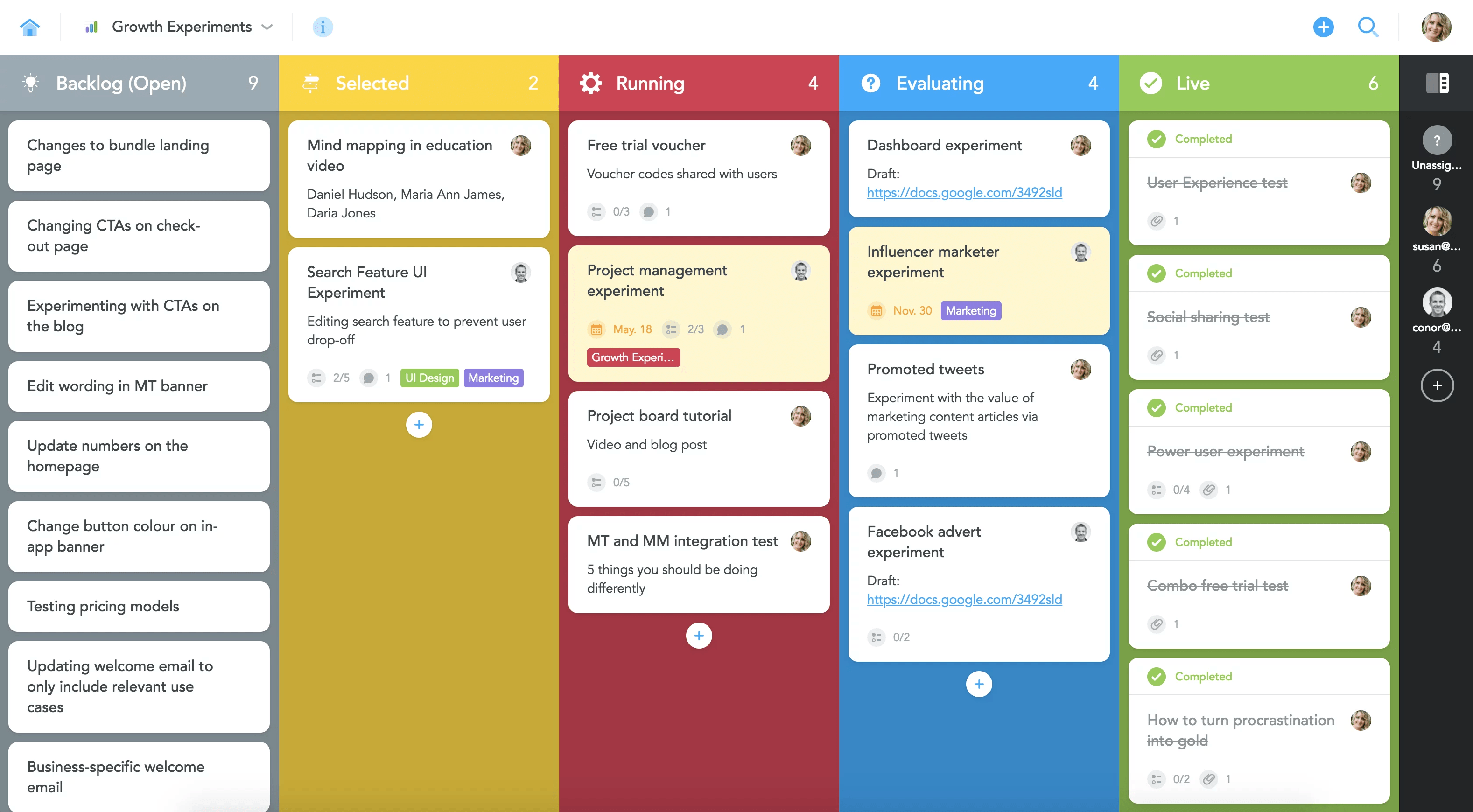
Smart organization apps also offer multiple views of your tasks. A simple list view works great for quick reference, while board views (like Kanban) help visualize workflows and project stages. Calendar integration ensures you see tasks alongside your appointments, giving you a complete picture of your day.
Note-Taking and Knowledge Management
Beyond simple task lists, comprehensive organization apps include powerful note-taking capabilities. Whether you’re capturing meeting minutes, saving research for a project, or journaling about your day, having everything in one place eliminates the frustration of hunting through multiple apps for information.
Advanced organization apps support rich text formatting, embedded images and videos, file attachments, and even web clippings. Some offer databases where you can structure information with custom properties, creating everything from reading lists to content calendars to habit trackers. 📚
Cross-Platform Synchronization
Your organizational system is only as good as its accessibility. The best apps sync seamlessly across smartphones, tablets, and computers, ensuring your information is always current regardless of which device you’re using. Cloud-based syncing happens automatically in the background, so you never have to think about manually updating across platforms.
This synchronization extends to offline access as well. Quality organization apps let you view and edit your content even without an internet connection, automatically syncing changes once you’re back online.
Finding Your Perfect Organization Style
Not everyone organizes information the same way, and that’s perfectly fine. Understanding your natural organizational preferences helps you choose an app that works with your brain rather than against it.
The Minimalist Approach
Some people thrive with simplicity. If you find elaborate systems overwhelming, look for apps that focus on essential features without excessive complexity. A clean interface with straightforward task lists, basic notes, and simple reminders might be all you need. The key is consistency—even a simple system works wonders when used regularly.
The Power User Method
If you love customization and want maximum flexibility, advanced organization apps offer nearly limitless possibilities. These tools let you build custom databases, create templates, link related information, and design workflows tailored precisely to your needs. While there’s a learning curve, the payoff is a system that grows and adapts with you over time.
The Visual Organizer
Visual thinkers often prefer apps with strong design elements—color coding, icons, boards, and galleries. Being able to see your information spatially rather than in linear lists can make planning feel more intuitive and engaging. Look for apps that prioritize aesthetic customization and offer multiple view options. 🎨
Transforming Different Areas of Your Life
Organization apps aren’t just for work tasks. Their versatility makes them valuable across every aspect of your life, from personal goals to household management.
Professional Project Management
For work projects, organization apps help you break large initiatives into manageable tasks, track deadlines, collaborate with teammates, and maintain documentation all in one place. You can create client folders, store meeting notes, manage timelines, and even track billable hours. The transparency and structure reduce stress and prevent important details from slipping through the cracks.
Academic Success
Students benefit enormously from organization apps. Track assignment due dates, organize research notes by subject, create study schedules, and maintain a knowledge base of course materials. Many students create databases for managing reading lists, tracking grades, planning course schedules, and organizing extracurricular commitments. Having everything accessible from your phone means you can study effectively wherever you are.
Personal Goal Achievement
Beyond immediate tasks, organization apps help you work toward long-term personal goals. Create a fitness tracker to log workouts and monitor progress, build a reading list with notes and ratings, plan travel adventures with research and itineraries, or maintain a gratitude journal. The flexibility of modern organization apps means you can design systems for virtually any personal pursuit. 💪
Household and Family Management
Running a household involves countless moving pieces—meal planning, grocery shopping, maintenance schedules, family calendars, and budgets. Organization apps can centralize all this information, making it accessible to everyone in the household. Create shared shopping lists that update in real-time, maintain a home maintenance log, track family events, and store important documents like warranty information or insurance details.
Building Habits That Stick
Having an organization app is one thing; actually using it consistently is another. The key to making these tools genuinely effective lies in developing sustainable habits around them.
Start with a daily review ritual. Spend five minutes each morning reviewing your tasks for the day and five minutes each evening planning for tomorrow. This simple practice creates clarity and prevents surprises. Many people find that doing this review at the same time daily—perhaps with morning coffee or before bed—helps it become automatic.
Conduct weekly planning sessions where you step back from daily tasks to look at the bigger picture. Review what you accomplished, adjust priorities, schedule tasks for the coming week, and clear out completed items. This weekly rhythm helps you stay aligned with your goals rather than just reacting to whatever seems urgent.
The “capture everything” mindset is transformative. When an idea, task, or commitment comes up, immediately add it to your organization app rather than trying to remember it. This mental offloading reduces stress and ensures nothing important gets forgotten. Make capturing new items as frictionless as possible—use voice input, quick add shortcuts, or widgets that put your inbox one tap away. 📝
Avoiding Common Organization Pitfalls
Even with powerful tools, certain mistakes can undermine your organizational efforts. Being aware of these pitfalls helps you avoid them.
Over-Complicating Your System
It’s tempting to create elaborate organizational structures with numerous categories, tags, and custom properties. While some complexity can be useful, going overboard makes maintenance exhausting. If you spend more time organizing than actually doing tasks, you’ve lost the plot. Start simple and only add complexity when you have a specific need.
App Hopping
When your current system feels imperfect, switching to a new app seems like the solution. But constantly jumping between tools means repeatedly recreating your organizational structure and never developing deep familiarity with any single system. Every app has quirks and limitations—success comes from working within those constraints rather than perpetually seeking the perfect tool.
Failing to Review and Update
An organization system requires maintenance. Old tasks pile up, outdated information lingers, and priorities drift. Without regular review sessions, your system gradually becomes cluttered and unreliable, eventually leading you to abandon it entirely. Schedule recurring reviews as non-negotiable appointments with yourself.
Privacy and Security Considerations
When you’re entrusting an app with personal information, professional projects, and potentially sensitive data, security matters. Research the privacy policies of organization apps you’re considering. Understand where your data is stored, how it’s encrypted, and what the company’s policies are regarding data access and sharing.
Look for apps that offer two-factor authentication for an extra layer of account security. Consider whether you need the option to password-protect specific notes or sections within the app. For particularly sensitive information, some users prefer organization apps that offer end-to-end encryption or the option to host data on private servers. 🔒
Making the Most of Collaboration Features
Organization apps shine brightest when used collaboratively. Whether you’re coordinating with family members, working on a team project, or planning an event with friends, shared workspaces keep everyone aligned.
Set clear expectations about how your shared space will be used. Establish naming conventions, decide who’s responsible for different sections, and determine how you’ll communicate changes. Use commenting features to discuss specific items without cluttering chat apps. Assign tasks to specific people so accountability is clear.
Real-time collaboration means multiple people can work simultaneously without overwriting each other’s changes. This is particularly valuable for projects with tight deadlines where team members need to contribute their parts concurrently. Version history features let you see who changed what and when, making it easy to track project evolution or restore previous versions if needed.
Integrating with Your Existing Tools
Your organization app doesn’t exist in isolation—it works best when connected to the other tools you use daily. Many organization apps offer integrations with email, calendar, cloud storage, and communication platforms.
Email integration might let you forward messages directly into your organization app, converting them into tasks or storing them as reference materials. Calendar sync ensures appointments appear alongside your task list. Cloud storage integration lets you attach files from services like Google Drive or Dropbox without leaving your organization app.
Some apps support automation through services like Zapier or IFTTT, enabling workflows like automatically creating tasks from form submissions or saving favorited tweets to your notes. While not everyone needs extensive integrations, they can significantly streamline workflows for power users. ⚡
The Future of Personal Organization
Organization apps continue evolving with emerging technologies. Artificial intelligence features are becoming more sophisticated, offering smart suggestions for task scheduling, automatically categorizing notes, and even drafting content based on your previous entries. Voice assistants integrate more deeply, allowing hands-free task creation and information retrieval.
Template marketplaces are expanding, where users share custom organizational setups for specific use cases—content creator workflows, research paper management, wedding planning, and countless others. This community-driven approach means you don’t have to build complex systems from scratch.
The trend toward “all-in-one” workspaces continues, with apps combining tasks, notes, databases, wikis, and project management into unified platforms. Rather than juggling separate tools for different purposes, everything lives in one interconnected space where information flows naturally between contexts.
Taking the First Step Toward Better Organization
If you’re currently feeling overwhelmed by disorganization, remember that improvement doesn’t happen overnight. Start by choosing one organization app and committing to it for at least a month. Begin with just one area of your life—perhaps work tasks or personal goals—rather than trying to organize everything at once.
Spend time learning the basics of your chosen app. Watch tutorial videos, read documentation, and experiment with different features. Most apps offer free plans that provide ample functionality for individual use, so you can fully explore before deciding whether premium features are worth the investment.
Be patient with yourself as you build new organizational habits. You’ll forget to check your app some days, tasks will slip through occasionally, and your system will need adjustments. That’s completely normal. What matters is consistency over perfection—showing up regularly and making incremental improvements to your process. 🌟
The transformation that comes from effective organization extends beyond simply completing more tasks. It’s about reducing mental clutter, lowering stress levels, creating space for creativity, and feeling genuinely in control of your time and commitments. When you stop expending energy trying to remember everything and instead trust your organizational system, you free up mental resources for deeper thinking, meaningful relationships, and the activities that truly matter to you.
Your journey toward better organization starts with a single step—downloading an app, creating your first task, writing your first note. From that small beginning, you’ll gradually build a system that supports your goals, reflects your values, and makes daily life just a little bit easier. In a world that constantly demands more of our attention and energy, having a reliable organizational foundation isn’t just helpful—it’s essential for maintaining both productivity and peace of mind.
