

Video editing apps have revolutionized content creation, empowering anyone with a smartphone to produce professional-quality videos anytime, anywhere.


Gone are the days when video editing required expensive software and powerful computers. Today’s mobile applications offer intuitive interfaces, advanced features, and seamless sharing capabilities that make video creation accessible to everyone from casual users to serious content creators.
Whether you’re crafting social media content, documenting life moments, or building a personal brand, the right video editing app transforms raw footage into captivating stories. Understanding which features matter most and how to choose the perfect app for your needs can dramatically elevate your video content game. 🎬
Why Mobile Video Editing Apps Have Become Essential Tools
The shift toward mobile video editing reflects broader changes in how we consume and create content. With over 80% of internet traffic now consisting of video content, the demand for quick, accessible editing solutions has exploded.
Mobile apps eliminate the technical barriers that once made video editing intimidating. You no longer need to master complex desktop software or invest thousands in equipment. Your smartphone already contains everything necessary to shoot, edit, and publish professional-looking videos within minutes.
Social media platforms like TikTok, Instagram Reels, and YouTube Shorts have further accelerated this trend. These platforms favor vertical video formats optimized for mobile viewing, making mobile editing apps the natural choice for creators targeting these audiences.
Key Features That Define Outstanding Video Editing Applications ✨
Not all video editing apps are created equal. The best applications share certain characteristics that separate them from mediocre alternatives.
Intuitive User Interface and Learning Curve
The interface should feel natural from the first moment you open the app. Look for applications with clear navigation, easily accessible tools, and helpful tutorials for beginners. The learning curve matters significantly—you want an app that grows with your skills rather than overwhelming you immediately.
Drag-and-drop functionality, visual timelines, and preview capabilities let you see changes in real-time, making the editing process feel more like creative play than technical work.
Comprehensive Editing Tools and Effects
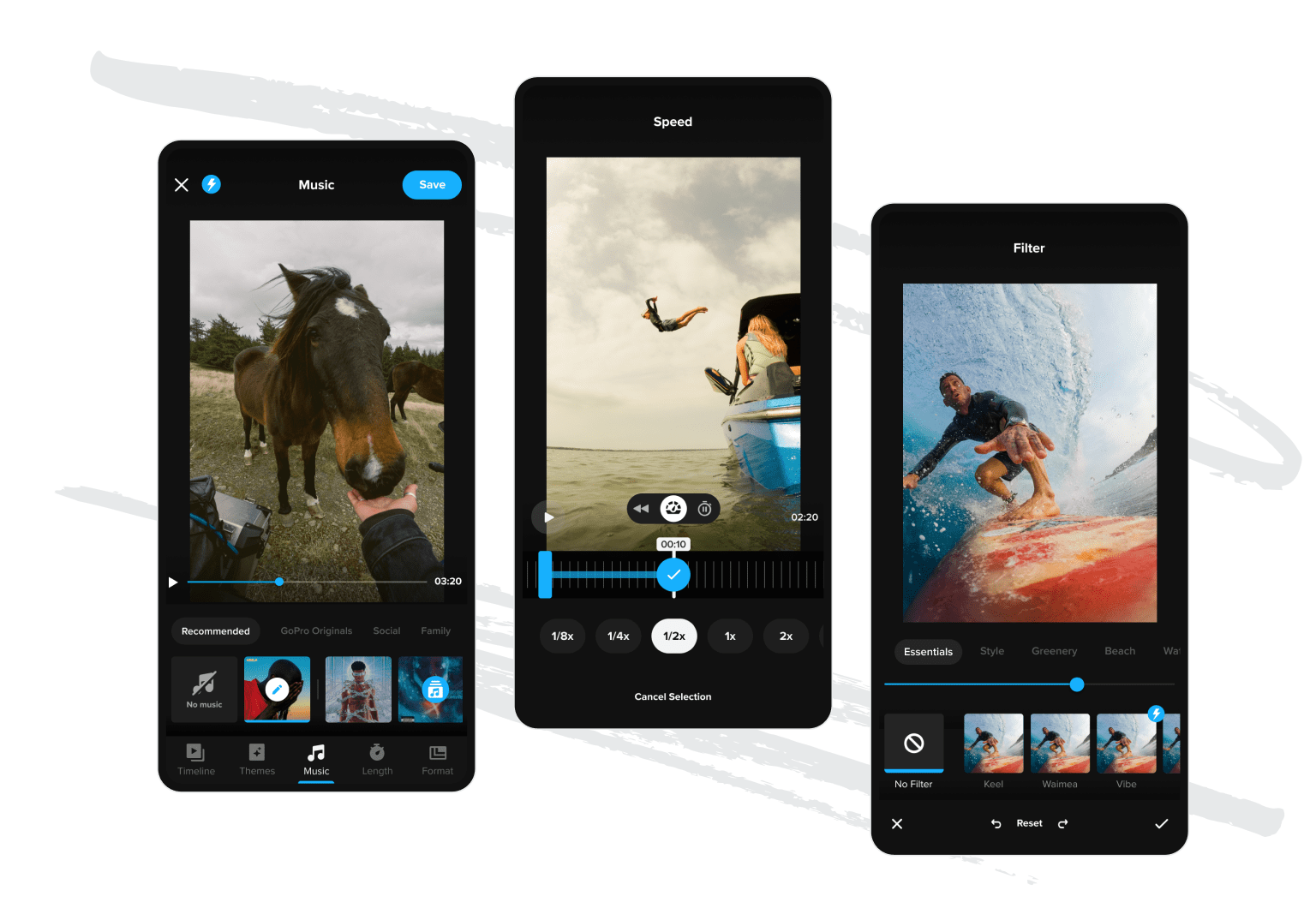
Professional video editing apps provide essential tools including trimming, splitting, merging clips, adjusting speed, and adding transitions. Advanced features might include keyframe animation, chroma keying (green screen), motion tracking, and color grading.
Effects libraries should offer diverse options without feeling gimmicky. Quality matters more than quantity—a dozen well-designed transitions prove more valuable than hundreds of cheesy effects that date your content.
Audio Editing Capabilities 🎵
Sound design separates amateur videos from professional productions. Superior editing apps include audio mixing, volume adjustment, noise reduction, and access to royalty-free music libraries. The ability to add voiceovers, sync audio with video, and apply audio effects significantly enhances storytelling potential.
Export Options and Quality Settings
Flexible export options ensure your videos look spectacular across different platforms. Look for apps that support various resolutions (720p, 1080p, 4K), aspect ratios (16:9, 9:16, 1:1), and file formats. Some apps optimize exports specifically for Instagram, YouTube, TikTok, or other platforms.

Popular Video Editing Apps Transforming Content Creation
The marketplace offers dozens of video editing applications, each with unique strengths. Understanding the landscape helps you identify which tool aligns best with your creative vision and technical requirements.
CapCut: The All-Around Powerhouse
CapCut has emerged as one of the most popular free video editing apps globally. Developed by ByteDance (TikTok’s parent company), it offers professional-grade features without watermarks or subscription fees.
The app excels at creating content optimized for social media platforms. Its extensive effects library, trending templates, and AI-powered features like auto-captions and background removal make it particularly attractive to influencers and content creators.
CapCut’s timeline-based editing feels familiar to anyone who’s used desktop software, yet remains accessible to complete beginners. The app regularly updates with new features, ensuring it stays current with trending styles and platform requirements.
Adobe Premiere Rush: Professional Tools Simplified
Adobe brings its legendary Premiere Pro capabilities to mobile devices through Premiere Rush. This app targets creators who want professional results without the complexity of full desktop software.
Premiere Rush shines in its seamless integration with Adobe’s creative ecosystem. Projects sync across devices, allowing you to start editing on your phone and finish on your computer. The color correction tools, motion graphics templates, and audio mixing capabilities rival many desktop applications.
InShot: Quick Edits with Style
InShot focuses on speed and simplicity, making it ideal for social media content creators who need to produce videos quickly. The app handles basic editing tasks beautifully while offering enough advanced features to satisfy intermediate users.
Text animations, stickers, filters, and music integration happen quickly with minimal taps. The interface prioritizes efficiency, letting you complete most edits in minutes rather than hours.
Specialized Features That Elevate Your Video Content 🚀
Beyond basic editing, modern apps incorporate sophisticated features that once required professional software and expertise.
AI-Powered Enhancements
Artificial intelligence has revolutionized mobile video editing. Auto-caption features transcribe speech automatically, saving hours of manual work. Smart background removal eliminates green screens, while AI-powered color correction analyzes footage and applies optimal adjustments instantly.
Face tracking keeps subjects centered, and intelligent scene detection automatically identifies where to place cuts. These features democratize techniques that previously required significant technical knowledge.
Templates and Presets for Instant Results
Pre-designed templates offer tremendous value for creators producing regular content. Simply drop your clips into template slots, and the app automatically applies transitions, effects, and timing. This approach works brilliantly for establishing consistent branding across video series.
Templates also serve educational purposes, showing beginners how professionals structure videos. Studying templates reveals pacing principles, transition choices, and effect applications you can later replicate in custom projects.
Collaborative Editing Capabilities
Some advanced apps support collaborative workflows, allowing multiple users to access and edit the same project. This feature proves invaluable for teams, whether you’re coordinating marketing content or collaborating on creative projects with friends.
Choosing the Right App for Your Specific Needs 🎯
Selecting the perfect video editing app depends on various factors beyond just features and price.
Consider Your Content Type
Different content types favor different apps. Social media creators prioritizing quick turnaround benefit from apps like CapCut or InShot. Vloggers wanting sophisticated color grading might prefer Adobe Premiere Rush or LumaFusion. Educational content creators needing precise text overlays have different requirements than travel videographers.
Evaluate Your Skill Level
Beginners should prioritize intuitive interfaces and helpful tutorials over extensive feature lists. Intermediate users benefit from apps offering room to grow. Advanced creators might accept steeper learning curves in exchange for professional-grade controls.
Free vs. Paid Applications
Many excellent free apps exist, but understand what you’re trading. Free versions might include watermarks, limited export options, or ads. Paid apps or subscriptions typically remove these limitations while adding premium features, effects libraries, and priority support.
Consider your usage frequency—casual users might tolerate free app limitations, while serious content creators quickly recoup subscription costs through saved time and enhanced output quality.
Mastering Video Editing Techniques on Mobile Devices 📱
Having powerful tools means little without understanding fundamental editing principles. These techniques elevate videos regardless of which app you choose.
Storytelling Through Cuts
Every cut serves a purpose—advancing the narrative, building tension, or maintaining viewer interest. Practice cutting on action, where transitions occur during movement, creating seamless flow between shots. Jump cuts work brilliantly for tutorials and vlogs, maintaining energy while removing dead air.
Pacing and Rhythm
Video pacing dramatically affects viewer engagement. Fast-paced editing suits energetic content like music videos or sports highlights, while slower pacing fits contemplative pieces or tutorials requiring comprehension time. Match your editing rhythm to your content’s emotional tone.
Color Grading for Mood
Color influences emotion powerfully. Warm tones create intimacy and nostalgia, while cool tones suggest professionalism or melancholy. Most editing apps provide color adjustment tools—experiment with slight modifications rather than extreme filters that quickly date your content.
Sound Design Essentials 🎧
Audio quality matters as much as visuals. Remove background noise, balance dialogue levels, and add subtle ambient sounds that enhance immersion. Music should complement rather than overpower—ducking audio levels during dialogue sections maintains clarity while preserving energy.
Optimizing Videos for Different Social Media Platforms
Each platform has unique requirements and audience expectations. Optimizing content accordingly maximizes engagement and reach.
Instagram and TikTok Specifications
These platforms favor vertical 9:16 aspect ratio videos. Keep the most important visual elements in the center-safe zone, as profile pictures and interface elements overlay the edges. Front-load interesting content—you have roughly three seconds to capture attention before users swipe away.
YouTube Optimization
YouTube still primarily uses horizontal 16:9 format, though YouTube Shorts follows vertical format rules. Create eye-catching thumbnails (which you can design in your editing app), and structure content to maintain watch time—YouTube’s algorithm rewards videos that keep viewers engaged longer.
Facebook and LinkedIn Considerations
These platforms autoplay videos without sound, making captions essential for capturing attention. Square 1:1 format often performs well, occupying maximum screen space in feeds. Keep videos concise—engagement drops significantly after 90 seconds on most social platforms.
Common Mistakes to Avoid When Editing Videos 🚫
Even experienced creators fall into editing traps that diminish video quality. Awareness helps you avoid these pitfalls.
Overusing Effects and Transitions
Flashy effects tempt beginners, but excessive use screams amateur. Each effect should serve a purpose beyond looking cool. Simple cuts often work better than elaborate transitions. When in doubt, less is more.
Neglecting Audio Quality
Viewers forgive mediocre visuals more readily than poor audio. Background noise, inconsistent levels, or distracting music ruins otherwise excellent videos. Always edit with headphones to catch audio issues invisible through phone speakers.
Ignoring Viewer Attention Spans
Modern audiences have limited patience. Trim ruthlessly—every second should provide value. Remove awkward pauses, false starts, and tangential content. Respect your viewers’ time, and they’ll reward you with engagement.
Future Trends Shaping Mobile Video Editing Technology 🔮
Video editing technology evolves rapidly. Understanding emerging trends helps you stay ahead of the curve.
Enhanced AI Integration
AI capabilities will expand dramatically, potentially handling entire edits from simple prompts. Imagine describing your desired video style, and AI automatically selects clips, applies effects, times cuts to music, and generates captions. This technology already exists in early forms and will only improve.
Augmented Reality Effects
AR integration in video editing apps will become standard, allowing creators to overlay digital elements that interact realistically with physical environments. This technology transforms storytelling possibilities, especially for educational content, entertainment, and marketing.
Cloud-Based Collaborative Editing
Cloud technology enables real-time collaborative editing from anywhere. Multiple creators can work simultaneously on the same project, with changes syncing instantly. This capability revolutionizes team workflows and expands creative possibilities.
Maximizing Your Creative Potential Through Consistent Practice ✍️
The gap between knowing video editing techniques and executing them skillfully closes through consistent practice. Challenge yourself with weekly projects exploring different styles, effects, or storytelling approaches.
Study videos you admire, analyzing editing choices frame-by-frame. What makes certain transitions feel smooth? How do creators maintain pacing? Why do specific color palettes evoke particular emotions? Active analysis accelerates learning beyond simple trial and error.
Join online communities where creators share techniques, provide feedback, and inspire experimentation. Platforms like Reddit, Facebook groups, and specialized forums connect you with creators at all skill levels, offering support and accountability.
Transforming Passion Into Professional Quality Content 🌟
Video editing apps have eliminated traditional barriers between amateur and professional content creation. The tools in your pocket rival equipment that cost thousands just years ago. What separates successful creators from the rest isn’t access to better tools—it’s dedication to craft, willingness to learn, and consistency in creation.
Start where you are with whatever app you choose. Experiment fearlessly, embrace mistakes as learning opportunities, and gradually refine your unique style. Every professional creator started as a beginner, fumbling through their first clumsy edits. The difference is they kept creating.
Your creative vision deserves to be shared with the world. Video editing apps provide the means—your imagination and persistence provide the magic. Download an app today, start experimenting, and discover the storyteller within you waiting to emerge.
The future of content creation belongs to those willing to learn, adapt, and consistently produce. With powerful editing tools literally at your fingertips, nothing stands between you and bringing your creative visions to life. Your audience awaits the stories only you can tell. 🎬✨
