
Video editing apps have transformed the way we create and share content, placing professional-grade tools right in the palm of our hands.


Whether you’re a content creator building your social media presence, a small business owner crafting marketing materials, or simply someone who wants to preserve memories in a creative way, video editing applications have become essential tools in our digital toolkit. The accessibility and power of these mobile solutions have democratized video production like never before.
Gone are the days when video editing required expensive desktop software and years of technical training. Today’s mobile apps offer intuitive interfaces, smart automation features, and professional results that rival traditional editing suites. Let’s explore everything you need to know about choosing and using the right video editor app for your needs.
📱 Why Mobile Video Editing Has Become Essential
The shift toward mobile video editing isn’t just a trend—it’s a fundamental change in how content is created and consumed. With smartphones capturing increasingly high-quality footage, it makes perfect sense to edit on the same device where you filmed.
Mobile editing apps offer unparalleled convenience. You can capture a moment, edit it while commuting, and share it with your audience before the day ends. This speed and flexibility have made mobile video editors indispensable for anyone serious about digital content creation.
The learning curve has also dramatically decreased. Modern apps use gesture-based controls and AI-powered features that make complex edits surprisingly simple. What once took hours in a desktop editing suite can now be accomplished in minutes on your phone.
🎬 Key Features Every Video Editor App Should Have
When evaluating video editing applications, certain features separate exceptional tools from mediocre ones. Understanding these core capabilities will help you make an informed decision.
Timeline-Based Editing
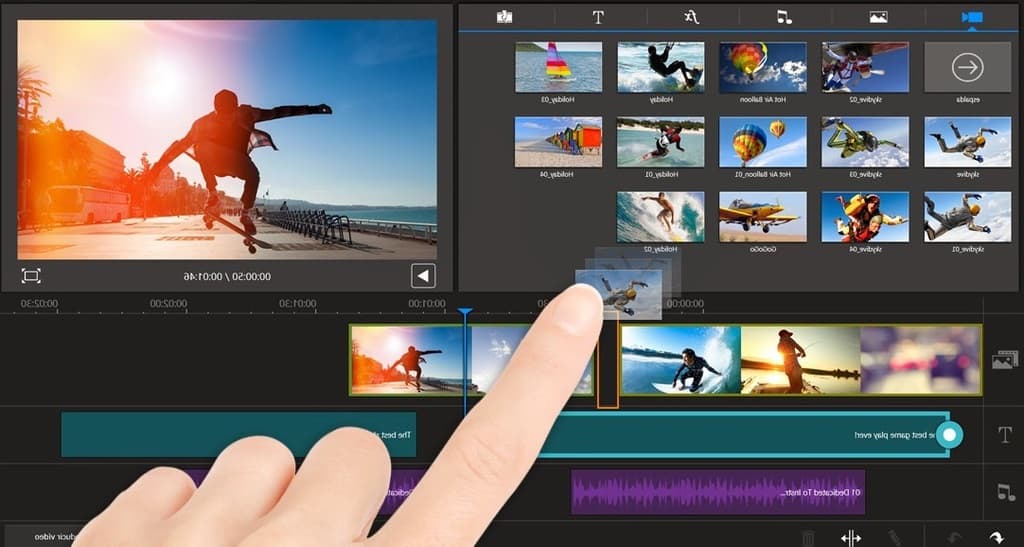
A robust timeline is the backbone of any serious video editor. This feature allows you to arrange clips, adjust timing, and layer multiple elements with precision. Look for apps that offer multi-track timelines, enabling you to overlay audio, video, text, and effects independently.
The best apps provide intuitive zoom functions and snapping tools that make frame-accurate editing possible even on smaller screens. This level of control ensures your final product looks polished and professional.
Comprehensive Transition Library
Transitions bridge the gap between clips, creating smooth visual flow throughout your video. Quality apps offer dozens of transition options—from simple fades to dynamic 3D effects—that can be customized to match your creative vision.
The ability to adjust transition duration and apply them with a single tap saves considerable time during the editing process. Some advanced apps even suggest transitions based on your video’s tempo and style.
Text and Title Tools
Adding text overlays, captions, and titles dramatically enhances viewer engagement and accessibility. Modern video editors include extensive font libraries, animation presets, and customization options that let you create professional-looking graphics without separate design software.
Animated text templates are particularly valuable for social media content, where eye-catching typography can significantly increase watch time and engagement rates.
🌟 Advanced Capabilities That Set Premium Apps Apart
While basic editing features are essential, advanced capabilities distinguish professional-grade apps from simple trim-and-share tools. These features unlock creative possibilities that elevate your content.
Color Grading and Correction
Professional video editors understand that color tells a story. Apps with robust color grading tools allow you to adjust brightness, contrast, saturation, and individual color channels to create specific moods and maintain visual consistency across clips.
Preset filters offer quick solutions, but the ability to create custom color profiles gives you complete creative control. Look for apps that support LUTs (Look-Up Tables) for applying cinematic color schemes with a single tap.
Audio Editing Suite
Great video editing isn’t just about visuals—audio quality can make or break your content. Premium apps include comprehensive audio tools like noise reduction, equalization, compression, and multi-track mixing capabilities.
The ability to detach audio from video clips, adjust levels independently, and add background music with automatic ducking (lowering music when dialogue plays) produces broadcast-quality results.
Motion Graphics and Effects
Keyframe animation allows you to create custom motion effects by defining start and end points for various properties like position, scale, rotation, and opacity. This powerful feature brings dynamic movement to static elements.
Advanced apps also include particle effects, chroma key (green screen) support, and masking tools that enable professional-level visual effects directly on your mobile device.

💡 Choosing the Right App for Your Specific Needs
Different creators have different requirements. Understanding your primary use case will help you select an app that aligns with your workflow and goals.
For Social Media Content Creators
If you’re creating content for Instagram, TikTok, YouTube Shorts, or similar platforms, prioritize apps with vertical video support, trending effects libraries, and direct publishing integration. Speed matters in social media, so look for templates and presets that accelerate your workflow.
Beat-matching features that automatically sync cuts to music rhythms are invaluable for creating engaging social content. Built-in libraries of royalty-free music and sound effects save time and avoid copyright issues.
For Business and Marketing
Business users need professional polish without steep learning curves. Look for apps offering branded templates, logo animation tools, and export options that maintain quality across various platforms and devices.
The ability to create consistent branding across multiple videos through saved color schemes, fonts, and graphic elements streamlines production for ongoing campaigns.
For Vloggers and Storytellers
Long-form content creators benefit from apps with advanced audio mixing, detailed timeline editing, and the ability to work with longer projects without performance issues. Chapter markers and project organization features become essential when managing extensive footage.
Look for apps that handle 4K footage smoothly and offer flexible export settings to balance file size with visual quality depending on your distribution platform.
🚀 Tips for Maximizing Your Video Editing App
Having powerful software is just the beginning—knowing how to use it efficiently transforms your creative output. These strategies will help you work smarter and produce better results.
Organize Your Media Before Editing
Spend a few minutes organizing your clips, audio files, and graphics before you start cutting. Most apps allow you to create folders or bins within projects. This simple step saves significant time and frustration during the editing process.
Rename your clips with descriptive names rather than default camera file names. When you’re searching for a specific shot among dozens of clips, clear naming conventions become invaluable.
Master Keyboard Shortcuts and Gestures
Even on mobile devices, gesture shortcuts dramatically accelerate editing. Take time to learn your app’s specific gestures for common actions like splitting clips, copying attributes, or zooming the timeline. This muscle memory accumulates into hours saved over time.
Many apps also support external keyboard shortcuts when connected to tablets or phones, bringing the editing experience closer to desktop efficiency.
Work with Proxies for Smooth Performance
When editing high-resolution footage on mobile devices, performance can occasionally lag. Many advanced apps offer proxy workflows—creating lower-resolution copies for editing while maintaining links to the original high-quality files for export.
This approach ensures smooth playback during editing while preserving final output quality. It’s particularly useful when working with 4K or 60fps footage on older devices.
🎨 Creative Techniques to Elevate Your Videos
Technical proficiency is important, but creative vision transforms ordinary footage into compelling content. These techniques leverage your app’s capabilities to create memorable videos.
The Power of Pacing and Rhythm
Varying your shot duration creates visual rhythm that keeps viewers engaged. Quick cuts build energy and excitement, while longer shots allow emotional moments to breathe. Pay attention to how professional content alternates between these approaches.
Music choice profoundly impacts perceived pacing. Experiment with cutting on the beat—aligning your edits with musical accents creates subconscious satisfaction that keeps audiences watching.
Strategic Use of B-Roll
B-roll footage—supplementary visuals that support your main content—adds professional polish and visual interest. When filming, capture extra footage of related activities, environments, and details that can be layered over primary footage or used as transitions.
This technique is particularly effective for covering jump cuts in dialogue or extending the visual storytelling beyond what your main camera angle can show.
Color Consistency Across Clips
Different lighting conditions create color and exposure variations between clips. Taking time to color-match your footage creates a cohesive, professional appearance that viewers may not consciously notice but subconsciously appreciate.
Most apps allow you to copy color adjustments from one clip and paste them onto others. Use this feature to quickly establish visual consistency throughout your project.
📊 Understanding Export Settings and Quality
Creating a beautiful edit means nothing if poor export settings compromise your final video. Understanding resolution, bitrate, and format options ensures your content looks its best wherever it’s viewed.
Resolution and Aspect Ratio
Match your export resolution to your distribution platform. YouTube and most viewing platforms handle 1080p or 4K beautifully, while Instagram Stories and TikTok often work best with vertical 9:16 ratios optimized for mobile viewing.
Avoid the temptation to always export at maximum resolution—larger file sizes can cause upload issues and don’t significantly improve viewing experience on smaller screens or slower connections.
Bitrate and Compression
Higher bitrates preserve more visual information but create larger files. Most platforms compress uploaded videos anyway, so exporting at excessively high bitrates often provides diminishing returns.
Experiment with your app’s quality presets to find the sweet spot where file size remains manageable without visible quality loss. This balance becomes crucial when regularly uploading content or working with storage constraints.
🔐 Privacy and Watermark Considerations
Many free video editing apps add watermarks to exported videos or require subscriptions for watermark-free exports. While this is understandable from a business perspective, it can impact the professional appearance of your content.
Evaluate whether the app’s capabilities justify a subscription cost. For serious content creators, the investment in a premium app typically pays for itself through time saved and professional results achieved.
Also consider privacy policies regarding how apps use your footage and data. Reputable apps clearly state their data practices, while questionable ones may have concerning policies buried in terms of service.
🌐 Cross-Platform Workflow and Project Portability
If you work across multiple devices—editing on your phone during commutes and refining on a tablet at home—project portability becomes essential. Some apps offer cloud syncing that seamlessly transfers projects between devices.
Others support exporting project files that can be opened on desktop versions of the software. This flexibility allows you to start edits mobile and finish with the expanded capabilities and larger screens of desktop environments.
Check whether your chosen app supports these workflows before committing to it for important projects. Few things are more frustrating than discovering incompatibility issues halfway through a complex edit.
✨ The Future of Mobile Video Editing
Artificial intelligence is rapidly transforming video editing capabilities. Modern apps already offer AI-powered features like automatic captioning, scene detection, background removal, and smart cropping that maintains focus on subjects when reformatting aspect ratios.
These intelligent features reduce tedious manual work, allowing creators to focus on creative decisions rather than technical execution. As AI capabilities expand, the gap between professional and consumer video editing tools continues to narrow.
Augmented reality integration represents another exciting frontier. Apps are beginning to incorporate AR effects that respond to real-world environments, creating immersive content that was previously impossible outside specialized studios.
🎯 Making Your Final Decision
Choosing the right video editor app ultimately depends on your specific needs, technical comfort level, and creative aspirations. Start by clearly defining what you want to create and which features are non-negotiable for your workflow.
Most quality apps offer free trials or limited free versions. Take advantage of these to test interface usability and feature sets before committing to subscriptions. Pay attention not just to capabilities but to how intuitive the app feels during actual editing sessions.
The best video editing app is the one you’ll actually use consistently. A simpler app you understand completely often produces better results than a feature-packed application whose complexity overwhelms you. Start with core features, master them thoroughly, then gradually explore advanced capabilities as your skills and needs evolve.
Video content dominates digital communication, and the ability to edit effectively has become a valuable skill across industries and interests. With the right app and dedication to learning, you can transform raw footage into compelling stories that inform, entertain, and inspire audiences around the world. Your creative journey begins with a single download—choose wisely, experiment boldly, and let your unique vision shine through every frame you edit.
